


I’ve spent years being comfortable asking AI for things: a draft, a summary, an idea to react to. Actually building something with it, a small process that runs on its own without me sitting there typing, is newer territory for me. So consider this the first entry in what I expect will be a clumsy, honest, ongoing log of me figuring it out in public. I’ll probably look back at this one in a few months and see ten things I’d do differently. That’s fine. That’s kind of the point of writing it down.
Here’s where I started.
The ritual
Every morning at 9:00, a Slack bot on our team - we call him Komuncan - posts the same line in #general: “Good morning! Let’s write today’s agenda.” And every morning, the whole company types their to-do list underneath it.
It’s a nice habit, genuinely. Everyone can see what everyone else is working on. But I wanted to keep my list more organized and actually be able to check at the end of the day what got done and what didn’t. So I asked Claude to help with exactly that. I didn’t set out to build anything clever. I just figured this is a chat interface; I’m allowed to just ask it to help with the literal, boring, repetitive part.
What I actually did
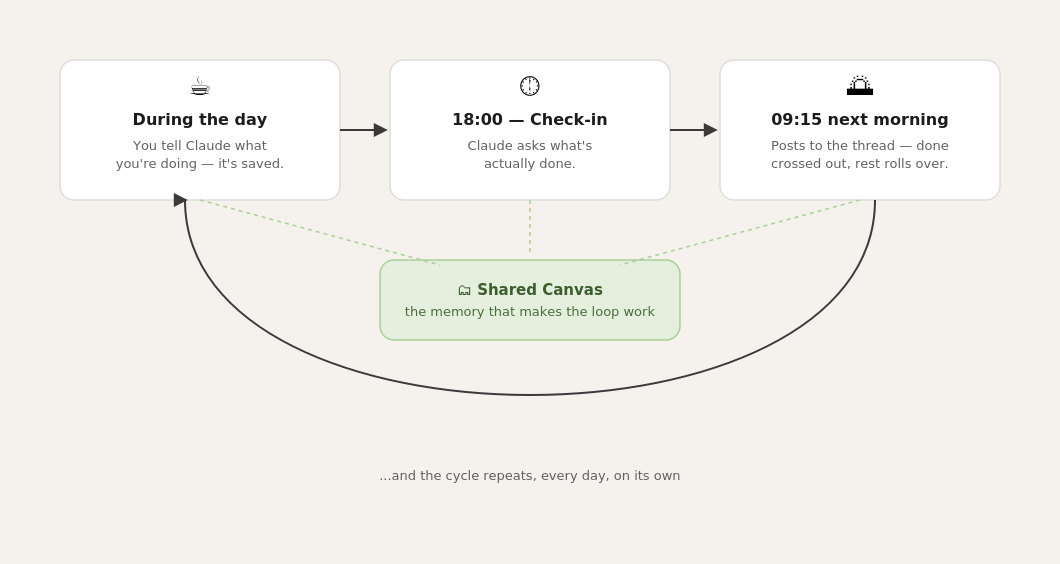
I asked Claude to help me keep a running list of my tasks instead of relying on my memory and a Slack thread. We landed on a shared Canvas - basically a doc both of us can read and write to - as the place my task list actually lives now, instead of disappearing into a scrolled-away channel.
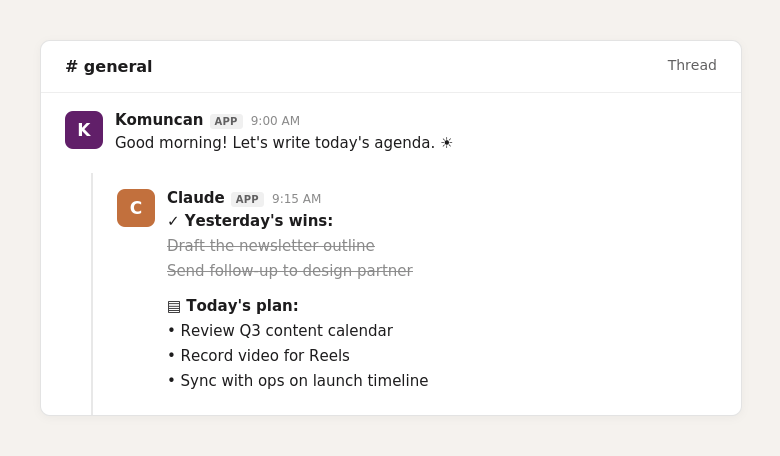
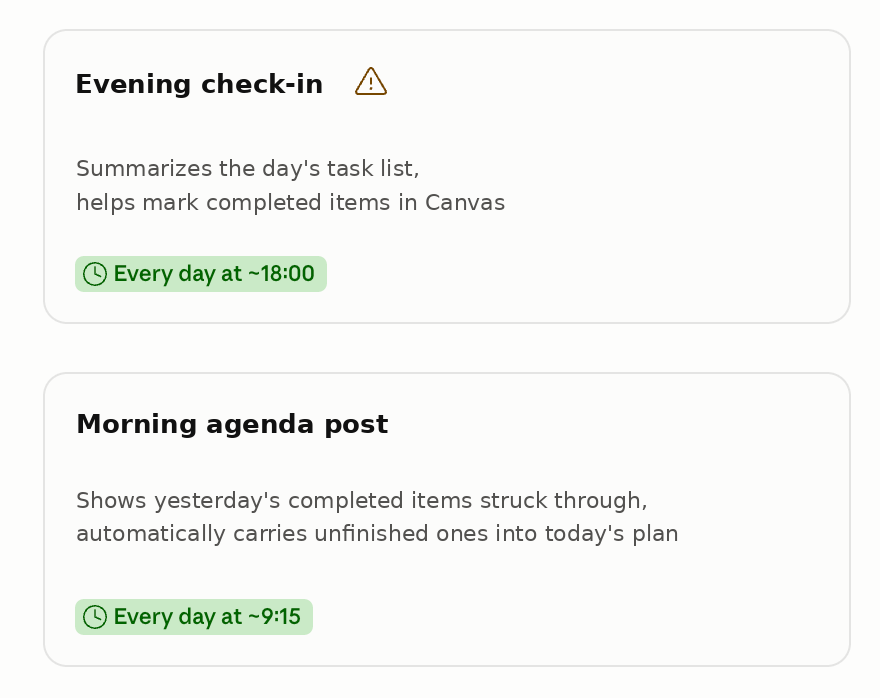
Then, because the company ritual specifically happens in that Slack thread, I asked if it was possible to have Claude post there for me, automatically, a few minutes after Komuncan does. Turns out: yes. Every morning at 9:15, it finds that thread on its own and replies with my list of yesterday’s finished items crossed out, anything I didn’t get to automatically carried into today so it doesn’t quietly disappear.
At 6 PM, it checks in with me and asks what actually got done. I want to be honest that this part still needs me; it’s not deciding on my behalf whether my day was productive; it’s just asking. I don’t know yet if that’s the “correct” way to do this, but it felt important not to let the one reflective part of my day get fully automated away, too.
What I’m taking from this, so far
I don’t think I’ve found a grand rule yet. What I can say is that this specific task recurring, same format every time, currently living only in my memory and a scrolling thread — turned out to be a pretty gentle place to start. It didn’t require anything technical from me beyond describing what I wanted, in plain language, more than once, until it worked the way I meant.
If you’re earlier in this than even I am, here’s the only advice I feel confident giving right now: find the one thing you retype in almost the same format every single day, and just ask if it’s possible to stop retyping it. You might be surprised at how small the first useful automation actually is.
I’m sure I’ll have more of these as I keep going; some will probably work better than this one, and I wouldn’t be shocked if a few fail in ways I can’t predict yet. I’ll write about those too.
If you’ve been experimenting with this kind of thing yourself, I’d genuinely like to hear what you’ve tried. Hit comment and tell me. I’m learning this in public; might as well learn from you too.